

A customer’s EG4 FlexBOSS 18 inverter was quietly cooking itself, and the EG4 monitoring app had absolutely no idea. That is not an insult to the hardware. It is an indictment of EG4’s software, and it is a story every battery and solar owner in Southwest Florida should hear before their inverter does the same thing.
This is how I diagnosed an intermittent overtemperature problem using a third-party monitoring tool called FourScoped, what the EG4 portal could not show me, and why notifications are the feature EG4 owners have been begging for on every solar forum I read.
Something was off, but the EG4 portal said nothing
The customer reached out because afternoon production looked lower than expected on a few of the hottest days last month. They had also seen two brief fault notifications appear and disappear in the EG4 app, but the app gave no detail, no time-series view of what happened, and no way to dig in after the fact. They were very helpful in alerting me to the problem, for sure, and sent a raw spreadsheet of verbose data that was overwhelming, even for a data geek like me.
I logged into monitor.eg4electronics.com expecting to find something useful. I did not.
The EG4 portal shows you a power flow diagram, a daily kWh number, and some basic charts that update every few minutes. That is fine for verifying the system is alive. It is pretty useless for diagnosis. You cannot chart historical temperature data. You cannot overlay metrics. You cannot chart inverter internal temperature next to load next to ambient conditions to find a pattern. You get pretty graphics and a pat on the head.
The forum chatter confirms this is universal. Search any solar forum for “EG4 app notifications” and you will find homeowners who have been asking EG4 for years to add basic alerts that work. Battery low alerts that never fire. Grid loss notifications that arrive after the grid is already back. Fault messages that show up an hour after the fault cleared, telling you something you already figured out by walking outside and looking. The EG4 hardware is genuinely good. The monitoring layer is a problem the manufacturer has not solved.
Enter FourScoped
A while back I started FourScoped, a third-party monitoring platform built specifically for EG4 inverter systems. You can find it at FourScoped.com. It connects to the same EG4 monitoring portal you already use, with the same credentials, and then it does what the EG4 app should have been doing all along.
The first thing I noticed was that the data was actually visible. Real charts, full history, every metric the inverter reports, all of it sitting in one interface that does not crash when I rotate my phone or quietly drop my login session.
For diagnosing this FlexBOSS 18, though, I needed more than nice charts. I needed the deep stuff. Visualization. Activate nerd mode.
The 99-metric view in Pro+ Hyper Mode
FourScoped’s Pro+ plan includes a feature called Hyper Mode. This is the diagnostic view I keep coming back to.
Hyper Mode pulls every raw metric the inverter reports, 99 of them in total, and lets you chart any of them over up to a week of history. Per-string voltage and power. Battery cell voltages and temperatures. Grid and EPS readings. Inverter internal temperatures. Heatsink temperatures. You name it, you can graph it, scroll it, zoom in, and overlay multiple inverters if it is a parallel system.
This is the kind of data engineers use during commissioning. It is the kind of data that has been mostly hidden from average EG4 owners until now.
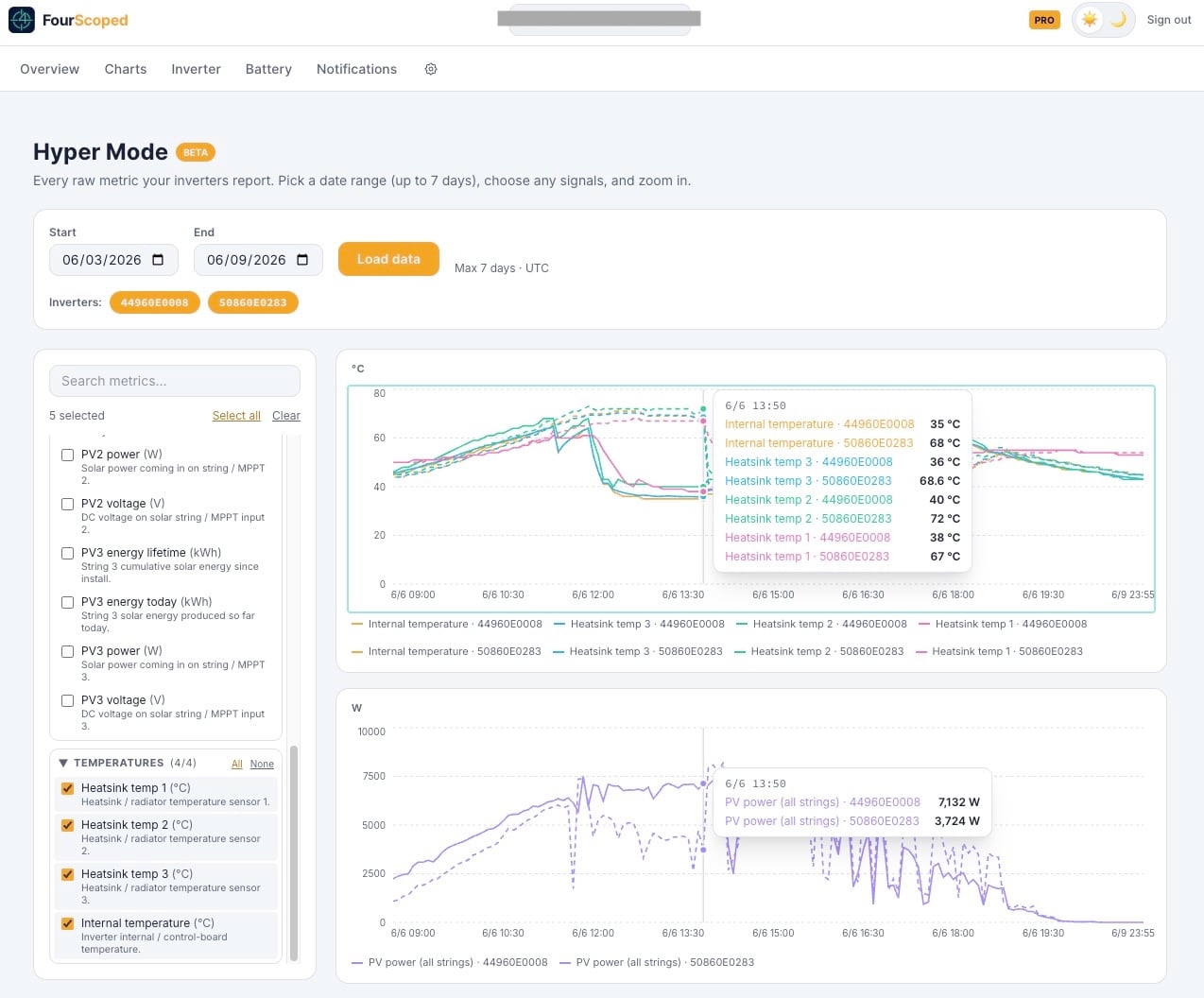
For this customer’s FlexBOSS 18, I pulled up Hyper Mode and started overlaying. Inverter ambient temperature. Heatsink temperature. AC output power. Solar input power. Three days of history, every reading the inverter took.
The pattern jumped out within thirty seconds.
What the data actually showed
Every afternoon between 1 PM and 4 PM the inverter heatsink temperature climbed steeply. On the two days the fault had occurred, it crossed the manufacturer’s derating threshold, which forced the inverter to throttle output to protect itself. That throttling explained the production dip the customer had noticed.
This is a classic Southwest Florida problem. We install inverters in garages because that is where the electrical panel lives, and Florida garages get brutally hot in the afternoon. Most of the time the inverter handles it fine. On a string of 95-plus degree days with full sun, you can find the edge of what the cooling system can do. This garage was actually air conditioned, but the inverter’s fans did not activate.
The fix
Once I could see the pattern, the fix was straightforward. The inverter firmware was known to cause this issue, delaying activation of ventilation fans too long. After the firware update, no more derating, no more nuisance faults.
Without the granular temperature data shown graphically, I would have been guessing. I might have blamed something else. In fact, I initially did! With the data, I knew exactly what to fix.
That diagnostic capability is what separates real monitoring from a dashboard.
The killer feature: notifications that actually work
The pain point I see most often from EG4 owners is not the data. It is the silence. The EG4 app’s notifications either do not fire, fire late, or fire on the wrong things. Search the EG4 community forum, and you will find an active thread titled “Need a solution for mobile app notifications” with replies going on for over a year. Battery low alerts that do not work. Grid offline alerts that arrive an hour after the grid came back. Customers asking, in plain language, for an alert when their battery hits 30 percent. They have been asking for years.
FourScoped fixes this. Pro users can set up alerts for battery SOC thresholds (above or below any percentage you pick), live solar production below a watt threshold during daylight hours, home load exceeding a limit, grid import or export exceeding a value, grid offline detection, no-data alerts that fire if the inverter stops reporting, daily yield targets, and battery charge or discharge rate thresholds. Each rule has a configurable cooldown so you do not get spammed. Alerts arrive within minutes, by email, with plain-English descriptions of what happened.
If I had set a heatsink temperature alert on this customer’s inverter ahead of time, I would have known about the problem the first day instead of waiting for a phone call after the second fault. That’s not something the app curently offers, but it is next on the roadmap. High inverter temperatures would be a great notification, right?!
Pro also includes advanced charts across day, week, month, year, and lifetime views, battery deep-dive with per-unit cell voltages, temperatures, cycle counts, and state of health, per-MPPT solar tracking so you can spot an underperforming string, and daily and monthly digest emails. The full feature breakdown is on the FourScoped FAQ.
Why this matters for every EG4 owner in Florida
If you own an EG4 inverter in Southwest Florida, this is not a hypothetical. Our climate is the worst-case scenario for heat-soaked electronics. Garage installations, attic-adjacent walls, west-facing exterior mounting, all of it stacks the deck against your inverter’s thermal envelope. The hardware is built for it, but only if the cooling system can do its job.
The EG4 app will not tell you when things start trending in the wrong direction. By the time you see a fault, the inverter has already derated, already shut down for protection, or already started accumulating wear on capacitors and semiconductors that did not have to wear out yet. Heat is the enemy of every piece of electronics in your house. Catching it early is the whole game.
I use FourScoped on every EG4 system we install now. It is read-only, so it cannot change settings or push commands to the inverter. It just watches, charts, and alerts. The credentials are encrypted at rest using AES-256-GCM, the same standard banks use, and the encryption key is stored separately from the data. You can start free, which gives you the live power flow diagram and basic overview, and upgrade to Pro if you want the charts, alerts, and battery analytics. Soon-to-be-released Pro+ unlocks Hyper Mode and the full 99-metric diagnostic view.
The bottom line
The EG4 hardware is solid. The EG4 monitoring software is not, and after years of forum complaints about missing notifications and superficial charts, the manufacturer has shown no real urgency to fix it. If you own a FlexBOSS 18 or any other EG4 inverter system, you should not be waiting for the manufacturer to ship the monitoring layer you actually need.
FourScoped.com is what I use. It found a heat problem on this customer’s system that the EG4 app missed. It would have caught it earlier if I had set the alerts up in advance. And the 99-metric Hyper Mode is the closest thing to a manufacturer-grade diagnostic tool that an EG4 owner can get on their own.
If you have an EG4 system installed by FSDG and you want help getting it set up on FourScoped, give us a call. If you have an EG4 system installed by someone else and you are tired of squinting at the EG4 portal, FourScoped takes about two minutes to connect. Either way, this is the monitoring upgrade your inverter has been waiting for.


